> ## Documentation Index
> Fetch the complete documentation index at: https://docs-staging-feat-member-mgmt-docs.mintlify.site/llms.txt
> Use this file to discover all available pages before exploring further.

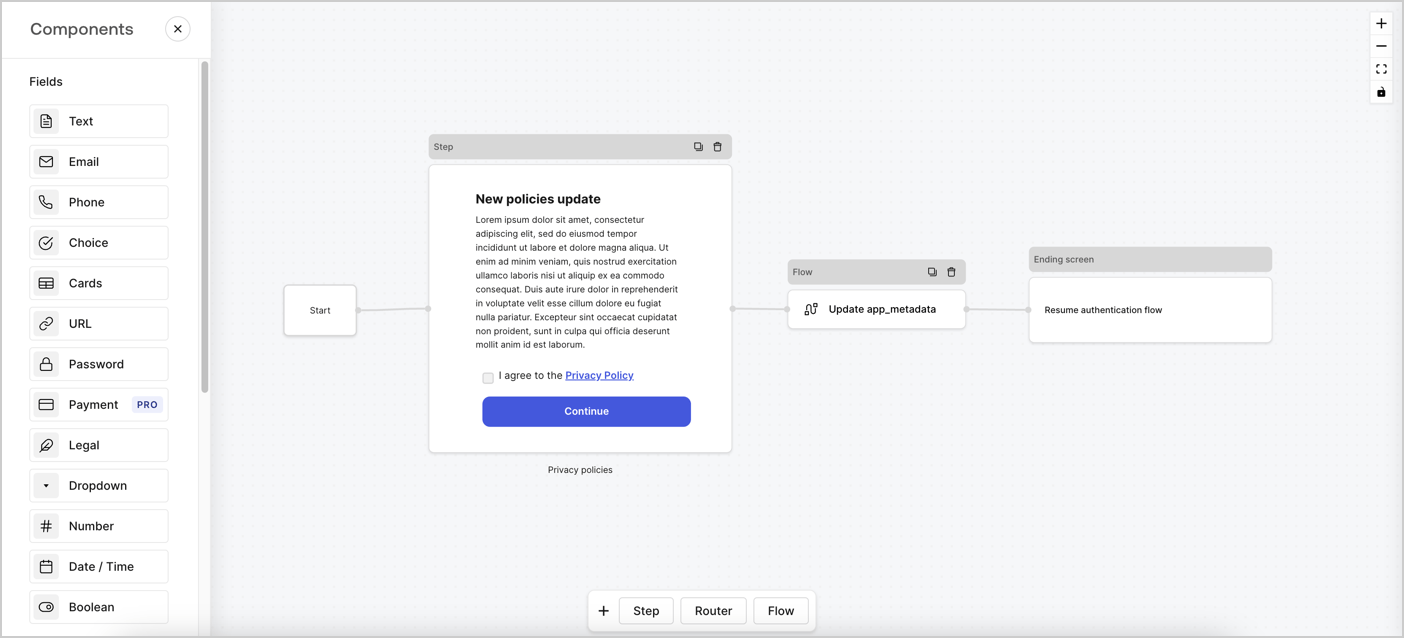
> Learn how to configure an update policy form using Forms for Actions for users to review and accept new terms of service or consent updates.

# Use Cases: Configure an update policy form using Forms

<Card title="Before you start">
  1. Create a [Machine-to-Machine Application](/docs/get-started/auth0-overview/create-applications/machine-to-machine-apps) with the following scopes enabled:

  * `read:users`
  * `update:users`
  * `create:users`
  * `read:users_app_metadata`
  * `update:users_app_metadata`
  * `create:users_app_metadata`

  2. Add a [Vault connection](/docs/customize/forms/vault) using the M2M application credentials.
</Card>

Forms for Actions allows you to create custom privacy policies flows and store the consent under the `app_metadata` object.
<Frame>
  <img src="https://mintcdn.com/docs-staging-feat-member-mgmt-docs/XLEmEYxBqZpPtRDX/docs/images/cdy7uua7fh8z/6i68dMvHDTijfRmSgN1x8Q/ad900e7d4c0fb34645921435472b8684/privavy-policy-form.png?fit=max&auto=format&n=XLEmEYxBqZpPtRDX&q=85&s=12a892e4d75727871e5f5a10ad55810e" alt="Dashboard > Actions > Forms > Privacy policy use case" data-og-width="1404" width="1404" data-og-height="638" height="638" data-path="docs/images/cdy7uua7fh8z/6i68dMvHDTijfRmSgN1x8Q/ad900e7d4c0fb34645921435472b8684/privavy-policy-form.png" data-optimize="true" data-opv="3" srcset="https://mintcdn.com/docs-staging-feat-member-mgmt-docs/XLEmEYxBqZpPtRDX/docs/images/cdy7uua7fh8z/6i68dMvHDTijfRmSgN1x8Q/ad900e7d4c0fb34645921435472b8684/privavy-policy-form.png?w=280&fit=max&auto=format&n=XLEmEYxBqZpPtRDX&q=85&s=c3ba96efbcd9b5541d2ce68f57e62840 280w, https://mintcdn.com/docs-staging-feat-member-mgmt-docs/XLEmEYxBqZpPtRDX/docs/images/cdy7uua7fh8z/6i68dMvHDTijfRmSgN1x8Q/ad900e7d4c0fb34645921435472b8684/privavy-policy-form.png?w=560&fit=max&auto=format&n=XLEmEYxBqZpPtRDX&q=85&s=4e3daa99cde868dc9e71ebc613c7d1b1 560w, https://mintcdn.com/docs-staging-feat-member-mgmt-docs/XLEmEYxBqZpPtRDX/docs/images/cdy7uua7fh8z/6i68dMvHDTijfRmSgN1x8Q/ad900e7d4c0fb34645921435472b8684/privavy-policy-form.png?w=840&fit=max&auto=format&n=XLEmEYxBqZpPtRDX&q=85&s=824b9bc5917982713da468e049cf2e2a 840w, https://mintcdn.com/docs-staging-feat-member-mgmt-docs/XLEmEYxBqZpPtRDX/docs/images/cdy7uua7fh8z/6i68dMvHDTijfRmSgN1x8Q/ad900e7d4c0fb34645921435472b8684/privavy-policy-form.png?w=1100&fit=max&auto=format&n=XLEmEYxBqZpPtRDX&q=85&s=43579cc8227976d9dfed4e15d1702381 1100w, https://mintcdn.com/docs-staging-feat-member-mgmt-docs/XLEmEYxBqZpPtRDX/docs/images/cdy7uua7fh8z/6i68dMvHDTijfRmSgN1x8Q/ad900e7d4c0fb34645921435472b8684/privavy-policy-form.png?w=1650&fit=max&auto=format&n=XLEmEYxBqZpPtRDX&q=85&s=5e29d7d82ecb58dccc54cbfb1fe24f28 1650w, https://mintcdn.com/docs-staging-feat-member-mgmt-docs/XLEmEYxBqZpPtRDX/docs/images/cdy7uua7fh8z/6i68dMvHDTijfRmSgN1x8Q/ad900e7d4c0fb34645921435472b8684/privavy-policy-form.png?w=2500&fit=max&auto=format&n=XLEmEYxBqZpPtRDX&q=85&s=348d7c9d024b01fb35b04b24b3909a77 2500w" />
</Frame>

The sections below outline how you can create an Update Policy form using nodes and flows, along with steps for adding your form to a [Post Login](/docs/customize/actions/explore-triggers/signup-and-login-triggers/login-trigger) Action.

## Create a form from scratch

Follow these steps to create a form to gather information:

1. Open the Form editor by selecting **Auth0 Dashboard > Actions > Forms.**
2. Select **Create Form** > **Start from scratch**.

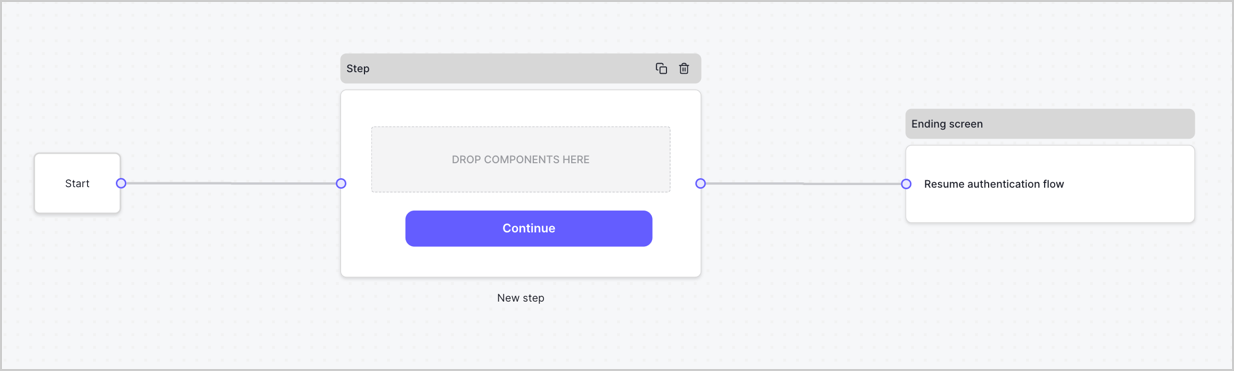
By default, a new form contains a Start node, a Step node, and an Ending screen node.
<Frame>
  <img src="https://mintcdn.com/docs-staging-feat-member-mgmt-docs/d8FAeGU0-El0S6va/docs/images/cdy7uua7fh8z/2TZ9jSjgEcARFpULI6hz4R/a4319a1bd482f2ee5cc23100fdb2f42c/New-form-Forms-for-action-use-case.png?fit=max&auto=format&n=d8FAeGU0-El0S6va&q=85&s=f4ac710716cc7e9f9c62cb8c4406918c" alt="Dashboard > Forms > Use Cases > Form" data-og-width="1234" width="1234" data-og-height="371" height="371" data-path="docs/images/cdy7uua7fh8z/2TZ9jSjgEcARFpULI6hz4R/a4319a1bd482f2ee5cc23100fdb2f42c/New-form-Forms-for-action-use-case.png" data-optimize="true" data-opv="3" srcset="https://mintcdn.com/docs-staging-feat-member-mgmt-docs/d8FAeGU0-El0S6va/docs/images/cdy7uua7fh8z/2TZ9jSjgEcARFpULI6hz4R/a4319a1bd482f2ee5cc23100fdb2f42c/New-form-Forms-for-action-use-case.png?w=280&fit=max&auto=format&n=d8FAeGU0-El0S6va&q=85&s=06e4bc3613287ec7f4f9d41ceb4c644b 280w, https://mintcdn.com/docs-staging-feat-member-mgmt-docs/d8FAeGU0-El0S6va/docs/images/cdy7uua7fh8z/2TZ9jSjgEcARFpULI6hz4R/a4319a1bd482f2ee5cc23100fdb2f42c/New-form-Forms-for-action-use-case.png?w=560&fit=max&auto=format&n=d8FAeGU0-El0S6va&q=85&s=65edcba88000a14342e45eccd0b5e593 560w, https://mintcdn.com/docs-staging-feat-member-mgmt-docs/d8FAeGU0-El0S6va/docs/images/cdy7uua7fh8z/2TZ9jSjgEcARFpULI6hz4R/a4319a1bd482f2ee5cc23100fdb2f42c/New-form-Forms-for-action-use-case.png?w=840&fit=max&auto=format&n=d8FAeGU0-El0S6va&q=85&s=a5ba48e27cbf08e3dab0517e2aebcaab 840w, https://mintcdn.com/docs-staging-feat-member-mgmt-docs/d8FAeGU0-El0S6va/docs/images/cdy7uua7fh8z/2TZ9jSjgEcARFpULI6hz4R/a4319a1bd482f2ee5cc23100fdb2f42c/New-form-Forms-for-action-use-case.png?w=1100&fit=max&auto=format&n=d8FAeGU0-El0S6va&q=85&s=49f77cd99426e5e5b13d9dba28237b24 1100w, https://mintcdn.com/docs-staging-feat-member-mgmt-docs/d8FAeGU0-El0S6va/docs/images/cdy7uua7fh8z/2TZ9jSjgEcARFpULI6hz4R/a4319a1bd482f2ee5cc23100fdb2f42c/New-form-Forms-for-action-use-case.png?w=1650&fit=max&auto=format&n=d8FAeGU0-El0S6va&q=85&s=4acf5ed9b55253b37af4b40abca144d2 1650w, https://mintcdn.com/docs-staging-feat-member-mgmt-docs/d8FAeGU0-El0S6va/docs/images/cdy7uua7fh8z/2TZ9jSjgEcARFpULI6hz4R/a4319a1bd482f2ee5cc23100fdb2f42c/New-form-Forms-for-action-use-case.png?w=2500&fit=max&auto=format&n=d8FAeGU0-El0S6va&q=85&s=4ea0d317bcb728e827f144745a495d16 2500w" />
</Frame>

### Configure the Step node

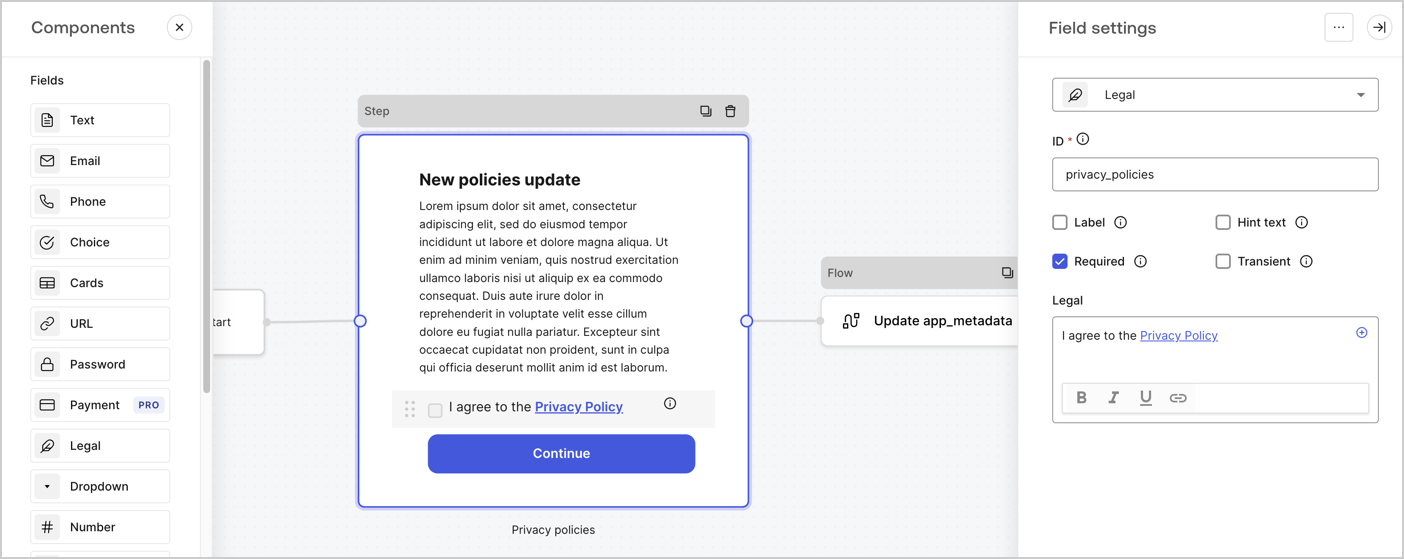
The Step node is the graphical interface visible to users. Add [Fields](/docs/customize/forms/nodes-and-components) to the Step node to collect the new agreement acceptance value by following these steps:

1. Drag a **Rich text** field from the **Components menu** into the **Step** node.

   * **Rich text**: Enter a description of your privacy policies updates.
   * Select **Save**.
2. Drag a **Legal** field into the **Step** node.

   * **ID**: Enter `privacy_policies`.
   * **Required**: Enable the checkbox.
   * **Legal**: Enter `I agree to the Privacy Policy`.
   * Select **Save**.
3. Select **Publish** to save.
<Frame>
  <img src="https://mintcdn.com/docs-staging-feat-member-mgmt-docs/e6tmYx3WVublKGhN/docs/images/cdy7uua7fh8z/59zFFjQjAnjogkc2QGIqqJ/0ad66b1b636544122aa4e65968b76c2c/privacy-policy-step-node.png?fit=max&auto=format&n=e6tmYx3WVublKGhN&q=85&s=68f9ab11a1d25b418336b0447d9a9a85" alt="Dashboard > Actions > Forms > Use case privacy policy step node" data-og-width="1404" width="1404" data-og-height="559" height="559" data-path="docs/images/cdy7uua7fh8z/59zFFjQjAnjogkc2QGIqqJ/0ad66b1b636544122aa4e65968b76c2c/privacy-policy-step-node.png" data-optimize="true" data-opv="3" srcset="https://mintcdn.com/docs-staging-feat-member-mgmt-docs/e6tmYx3WVublKGhN/docs/images/cdy7uua7fh8z/59zFFjQjAnjogkc2QGIqqJ/0ad66b1b636544122aa4e65968b76c2c/privacy-policy-step-node.png?w=280&fit=max&auto=format&n=e6tmYx3WVublKGhN&q=85&s=17d31d845af7c31c02818397047d4110 280w, https://mintcdn.com/docs-staging-feat-member-mgmt-docs/e6tmYx3WVublKGhN/docs/images/cdy7uua7fh8z/59zFFjQjAnjogkc2QGIqqJ/0ad66b1b636544122aa4e65968b76c2c/privacy-policy-step-node.png?w=560&fit=max&auto=format&n=e6tmYx3WVublKGhN&q=85&s=1afdf09d97a13868d43838c0cf69b474 560w, https://mintcdn.com/docs-staging-feat-member-mgmt-docs/e6tmYx3WVublKGhN/docs/images/cdy7uua7fh8z/59zFFjQjAnjogkc2QGIqqJ/0ad66b1b636544122aa4e65968b76c2c/privacy-policy-step-node.png?w=840&fit=max&auto=format&n=e6tmYx3WVublKGhN&q=85&s=f8e22278ad3640544559c4c91638e38d 840w, https://mintcdn.com/docs-staging-feat-member-mgmt-docs/e6tmYx3WVublKGhN/docs/images/cdy7uua7fh8z/59zFFjQjAnjogkc2QGIqqJ/0ad66b1b636544122aa4e65968b76c2c/privacy-policy-step-node.png?w=1100&fit=max&auto=format&n=e6tmYx3WVublKGhN&q=85&s=47eac5109a16fef5171ae67479e3f5b0 1100w, https://mintcdn.com/docs-staging-feat-member-mgmt-docs/e6tmYx3WVublKGhN/docs/images/cdy7uua7fh8z/59zFFjQjAnjogkc2QGIqqJ/0ad66b1b636544122aa4e65968b76c2c/privacy-policy-step-node.png?w=1650&fit=max&auto=format&n=e6tmYx3WVublKGhN&q=85&s=2418a44b382aa157f66e2fa1d2a6d545 1650w, https://mintcdn.com/docs-staging-feat-member-mgmt-docs/e6tmYx3WVublKGhN/docs/images/cdy7uua7fh8z/59zFFjQjAnjogkc2QGIqqJ/0ad66b1b636544122aa4e65968b76c2c/privacy-policy-step-node.png?w=2500&fit=max&auto=format&n=e6tmYx3WVublKGhN&q=85&s=f0490ef1a8f9b7671c864878fee46797 2500w" />
</Frame>

### Configure the Flow node

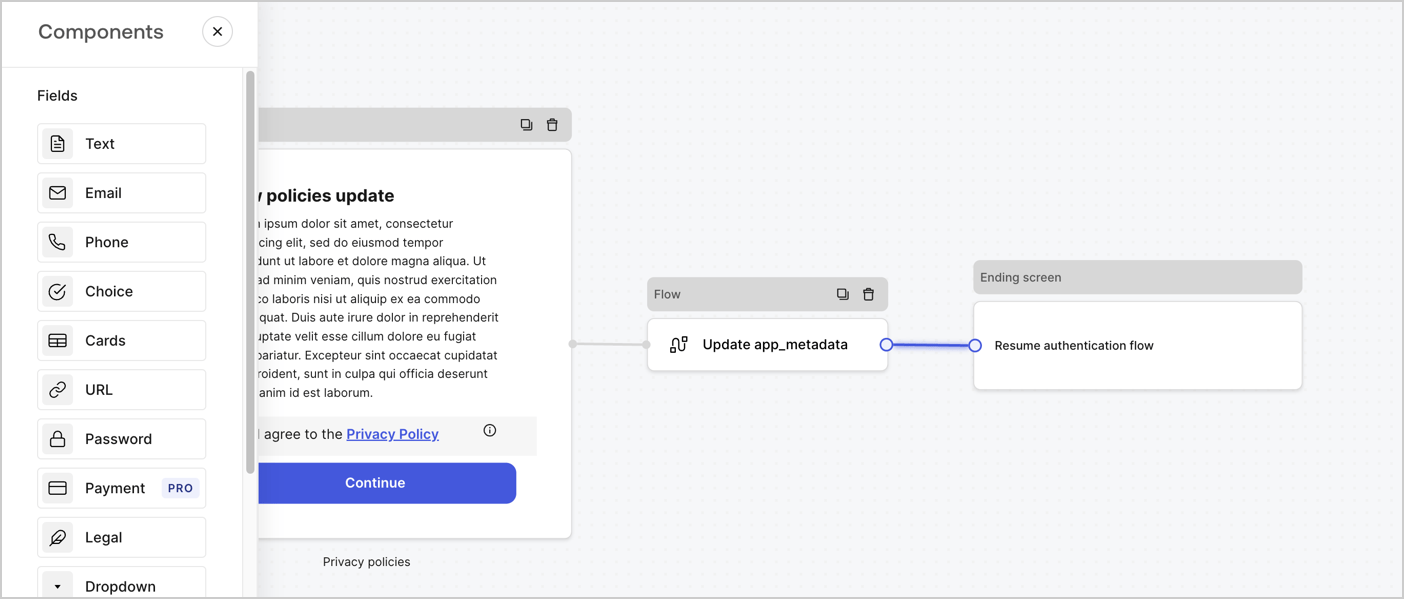
Add a **Flow** node after the **Step** node to update the `app_metadata` and resume the authentication flow by following these steps:

1. Select **Flow** from the bottom of the Form editor.
2. Remove the existing link between the **Step** and **Ending Screen** nodes.
3. Select the new **Flow** > **Click to add a flow** > **Create a new flow.**

   * Enter `Update app_metadata` in the **Name** field.
   * Select **Create**.
   * Select **Save**.
4. Link the **Flow** node to the **Step** and **Ending Screen** nodes as pictured below.
5. Select **Publish** to save.
<Frame>
  <img src="https://mintcdn.com/docs-staging-feat-member-mgmt-docs/XLEmEYxBqZpPtRDX/docs/images/cdy7uua7fh8z/6YIkzm7SrpM9LW76AXuRzh/353c518fe82bbaa440836da1d83596d6/link-policies.png?fit=max&auto=format&n=XLEmEYxBqZpPtRDX&q=85&s=bf7451cb587ab1688fd7535d0d8e6697" alt="Dashboard > Actions > Forms > Form" data-og-width="1404" width="1404" data-og-height="599" height="599" data-path="docs/images/cdy7uua7fh8z/6YIkzm7SrpM9LW76AXuRzh/353c518fe82bbaa440836da1d83596d6/link-policies.png" data-optimize="true" data-opv="3" srcset="https://mintcdn.com/docs-staging-feat-member-mgmt-docs/XLEmEYxBqZpPtRDX/docs/images/cdy7uua7fh8z/6YIkzm7SrpM9LW76AXuRzh/353c518fe82bbaa440836da1d83596d6/link-policies.png?w=280&fit=max&auto=format&n=XLEmEYxBqZpPtRDX&q=85&s=29b667de07d9c7d780f548b85e07dc7c 280w, https://mintcdn.com/docs-staging-feat-member-mgmt-docs/XLEmEYxBqZpPtRDX/docs/images/cdy7uua7fh8z/6YIkzm7SrpM9LW76AXuRzh/353c518fe82bbaa440836da1d83596d6/link-policies.png?w=560&fit=max&auto=format&n=XLEmEYxBqZpPtRDX&q=85&s=8ef9dbff4da73614f38a9a4ebda4608c 560w, https://mintcdn.com/docs-staging-feat-member-mgmt-docs/XLEmEYxBqZpPtRDX/docs/images/cdy7uua7fh8z/6YIkzm7SrpM9LW76AXuRzh/353c518fe82bbaa440836da1d83596d6/link-policies.png?w=840&fit=max&auto=format&n=XLEmEYxBqZpPtRDX&q=85&s=f52c179a9ced47efc08e52f933bb3f4f 840w, https://mintcdn.com/docs-staging-feat-member-mgmt-docs/XLEmEYxBqZpPtRDX/docs/images/cdy7uua7fh8z/6YIkzm7SrpM9LW76AXuRzh/353c518fe82bbaa440836da1d83596d6/link-policies.png?w=1100&fit=max&auto=format&n=XLEmEYxBqZpPtRDX&q=85&s=cfa63ab0b9a0f4658d860cebb3c2e3f6 1100w, https://mintcdn.com/docs-staging-feat-member-mgmt-docs/XLEmEYxBqZpPtRDX/docs/images/cdy7uua7fh8z/6YIkzm7SrpM9LW76AXuRzh/353c518fe82bbaa440836da1d83596d6/link-policies.png?w=1650&fit=max&auto=format&n=XLEmEYxBqZpPtRDX&q=85&s=dcfa78e00b7af31b1d8c0439dd05de49 1650w, https://mintcdn.com/docs-staging-feat-member-mgmt-docs/XLEmEYxBqZpPtRDX/docs/images/cdy7uua7fh8z/6YIkzm7SrpM9LW76AXuRzh/353c518fe82bbaa440836da1d83596d6/link-policies.png?w=2500&fit=max&auto=format&n=XLEmEYxBqZpPtRDX&q=85&s=216859c194e04680ea9a4adea9616b82 2500w" />
</Frame>

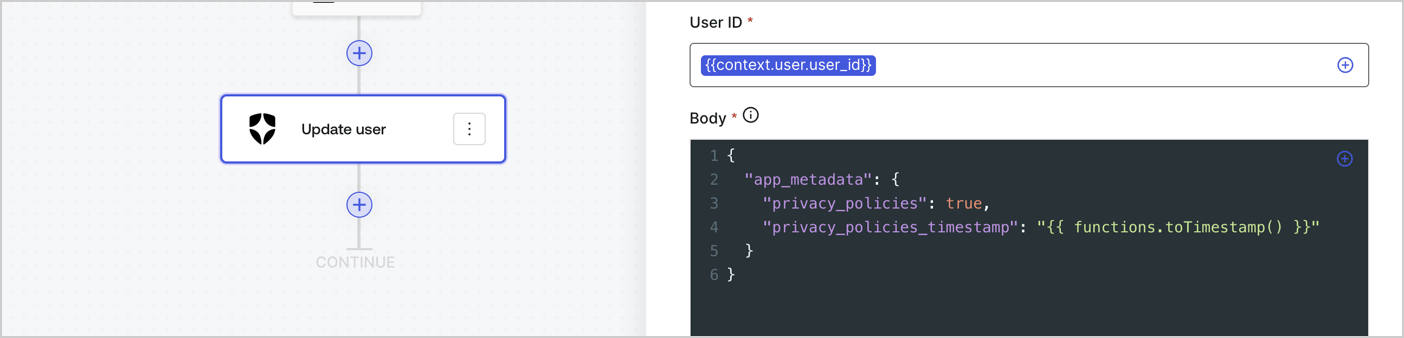
Add an Auth0 Update user action to the flow by following these steps:

1. Select the **Flow** **Update app\_metadata** > **Edit flow** to open the Flow editor in a new tab.
2. Below the StartAction, select the **+** icon to add an **Update user** action. Complete the fields below, then select **Save** to continue.

   * **Connection**: Select from the dropdown the Vault connection to your M2M application.

   * **User ID**: Enter `{{context.user.user_id}}`.

   * **Body**: Copy and paste the following code to update the app\_metadata with the privacy\_policies and privacy\_policies\_timestamp properties.

     ```text lines theme={null}
     {
       "app_metadata": {
         "privacy_policies": true,
         "privacy_policies_timestamp": "{{ functions.toTimestamp() }}"
       }
     }
     ```

   * Select **Save**.
3. Select **Publish** to save.
<Frame>
  <img src="https://mintcdn.com/docs-staging-feat-member-mgmt-docs/kxJoLU_2dd8CR5w_/docs/images/cdy7uua7fh8z/CvMNIwWrOUwaFW4X3G28p/1fb70ae57a20749d9ffaaba8dc0b7e26/update-user-privacy.png?fit=max&auto=format&n=kxJoLU_2dd8CR5w_&q=85&s=779eccb4e543f22a0d9f4f6e9334be94" alt="Dashboard > Actions > Forms > User case privacy policy code" data-og-width="1404" width="1404" data-og-height="338" height="338" data-path="docs/images/cdy7uua7fh8z/CvMNIwWrOUwaFW4X3G28p/1fb70ae57a20749d9ffaaba8dc0b7e26/update-user-privacy.png" data-optimize="true" data-opv="3" srcset="https://mintcdn.com/docs-staging-feat-member-mgmt-docs/kxJoLU_2dd8CR5w_/docs/images/cdy7uua7fh8z/CvMNIwWrOUwaFW4X3G28p/1fb70ae57a20749d9ffaaba8dc0b7e26/update-user-privacy.png?w=280&fit=max&auto=format&n=kxJoLU_2dd8CR5w_&q=85&s=10f76503629dd6f437159d71df976c45 280w, https://mintcdn.com/docs-staging-feat-member-mgmt-docs/kxJoLU_2dd8CR5w_/docs/images/cdy7uua7fh8z/CvMNIwWrOUwaFW4X3G28p/1fb70ae57a20749d9ffaaba8dc0b7e26/update-user-privacy.png?w=560&fit=max&auto=format&n=kxJoLU_2dd8CR5w_&q=85&s=3c9ac996196592a90fa524e9073f4bb9 560w, https://mintcdn.com/docs-staging-feat-member-mgmt-docs/kxJoLU_2dd8CR5w_/docs/images/cdy7uua7fh8z/CvMNIwWrOUwaFW4X3G28p/1fb70ae57a20749d9ffaaba8dc0b7e26/update-user-privacy.png?w=840&fit=max&auto=format&n=kxJoLU_2dd8CR5w_&q=85&s=1db54daba4a41bd5dba319063873442f 840w, https://mintcdn.com/docs-staging-feat-member-mgmt-docs/kxJoLU_2dd8CR5w_/docs/images/cdy7uua7fh8z/CvMNIwWrOUwaFW4X3G28p/1fb70ae57a20749d9ffaaba8dc0b7e26/update-user-privacy.png?w=1100&fit=max&auto=format&n=kxJoLU_2dd8CR5w_&q=85&s=3bc3494feafc18b35ba579109ebc2be5 1100w, https://mintcdn.com/docs-staging-feat-member-mgmt-docs/kxJoLU_2dd8CR5w_/docs/images/cdy7uua7fh8z/CvMNIwWrOUwaFW4X3G28p/1fb70ae57a20749d9ffaaba8dc0b7e26/update-user-privacy.png?w=1650&fit=max&auto=format&n=kxJoLU_2dd8CR5w_&q=85&s=6f0a931951c10ef5702ce16229dbe3dd 1650w, https://mintcdn.com/docs-staging-feat-member-mgmt-docs/kxJoLU_2dd8CR5w_/docs/images/cdy7uua7fh8z/CvMNIwWrOUwaFW4X3G28p/1fb70ae57a20749d9ffaaba8dc0b7e26/update-user-privacy.png?w=2500&fit=max&auto=format&n=kxJoLU_2dd8CR5w_&q=85&s=5118457e269468729915003fef0127b4 2500w" />
</Frame>

<Callout icon="file-lines" color="#0EA5E9" iconType="regular">
  The flow **Update app\_metadata** adds a `privacy_policies true` value to the app`_metadata` object and also generates a timestamp with a [helper function.](/docs/customize/forms/variables)
</Callout>

## Retrieve the form render code

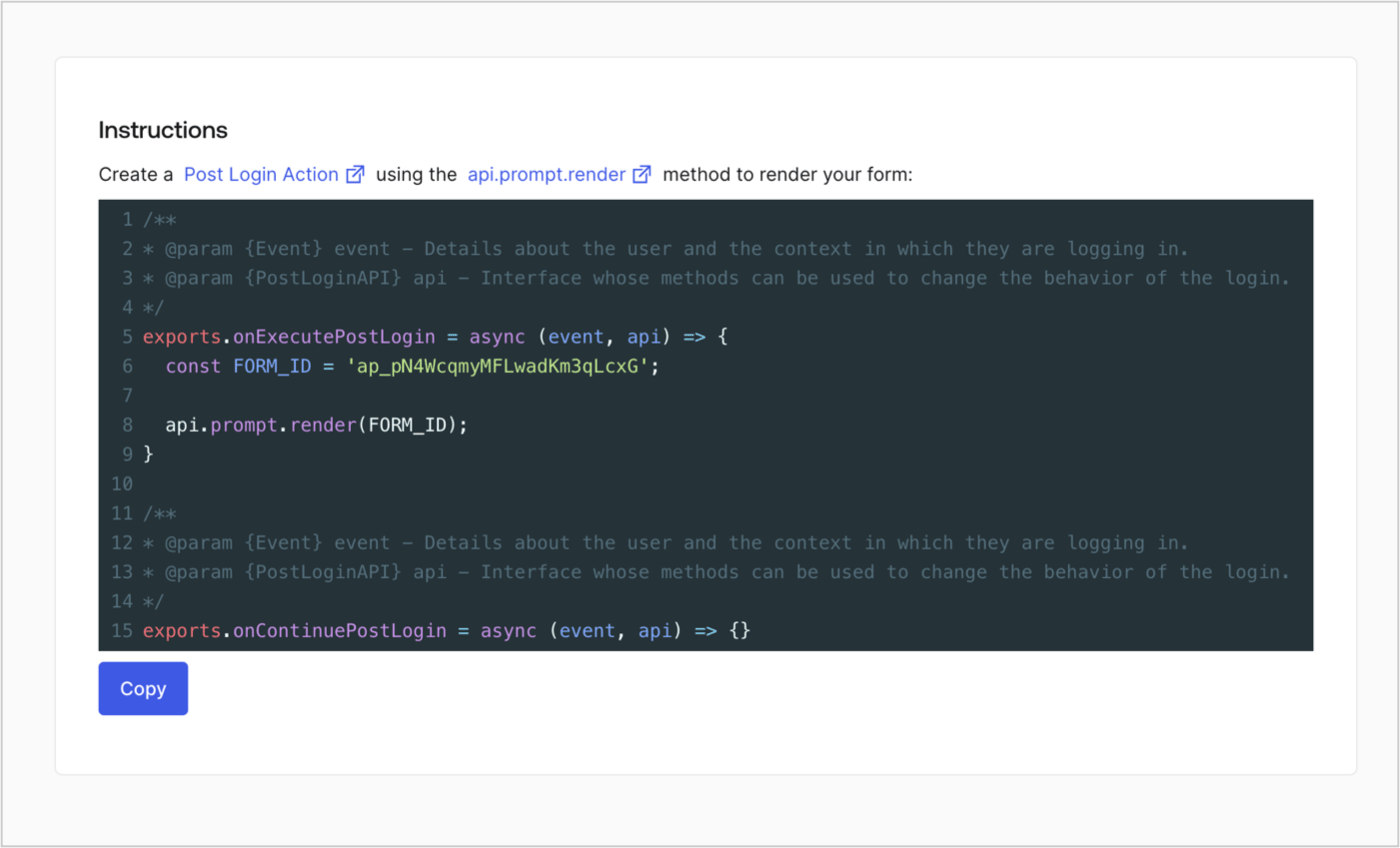
Retrieve your form render code to visually render the form with a custom Post Login Action by following these steps:

* From the Form editor, select **`<> Render`**.
* Select **Copy**.
<Frame>
  <img src="https://mintcdn.com/docs-staging-feat-member-mgmt-docs/GGmjEgkJbirdDTmf/docs/images/cdy7uua7fh8z/2EIUzc539sq9lwoTKbjoJv/496a864c0fc44a782c9cadca119dbfb0/embed.png?fit=max&auto=format&n=GGmjEgkJbirdDTmf&q=85&s=a8f33665169c1bb4f6a8b05fe2c77682" alt="Dashboard > Actions > Forms > Form > Embed" data-og-width="1400" width="1400" data-og-height="848" height="848" data-path="docs/images/cdy7uua7fh8z/2EIUzc539sq9lwoTKbjoJv/496a864c0fc44a782c9cadca119dbfb0/embed.png" data-optimize="true" data-opv="3" srcset="https://mintcdn.com/docs-staging-feat-member-mgmt-docs/GGmjEgkJbirdDTmf/docs/images/cdy7uua7fh8z/2EIUzc539sq9lwoTKbjoJv/496a864c0fc44a782c9cadca119dbfb0/embed.png?w=280&fit=max&auto=format&n=GGmjEgkJbirdDTmf&q=85&s=a637aaa5c5cd8fe53f66759462a94cc0 280w, https://mintcdn.com/docs-staging-feat-member-mgmt-docs/GGmjEgkJbirdDTmf/docs/images/cdy7uua7fh8z/2EIUzc539sq9lwoTKbjoJv/496a864c0fc44a782c9cadca119dbfb0/embed.png?w=560&fit=max&auto=format&n=GGmjEgkJbirdDTmf&q=85&s=7fc3934690ad2abc96f92ec9c09401d2 560w, https://mintcdn.com/docs-staging-feat-member-mgmt-docs/GGmjEgkJbirdDTmf/docs/images/cdy7uua7fh8z/2EIUzc539sq9lwoTKbjoJv/496a864c0fc44a782c9cadca119dbfb0/embed.png?w=840&fit=max&auto=format&n=GGmjEgkJbirdDTmf&q=85&s=6dec67e9783ff57628b883aab1b9da29 840w, https://mintcdn.com/docs-staging-feat-member-mgmt-docs/GGmjEgkJbirdDTmf/docs/images/cdy7uua7fh8z/2EIUzc539sq9lwoTKbjoJv/496a864c0fc44a782c9cadca119dbfb0/embed.png?w=1100&fit=max&auto=format&n=GGmjEgkJbirdDTmf&q=85&s=d93847d001f5803f4ba504bed1ae6e3c 1100w, https://mintcdn.com/docs-staging-feat-member-mgmt-docs/GGmjEgkJbirdDTmf/docs/images/cdy7uua7fh8z/2EIUzc539sq9lwoTKbjoJv/496a864c0fc44a782c9cadca119dbfb0/embed.png?w=1650&fit=max&auto=format&n=GGmjEgkJbirdDTmf&q=85&s=224de1fbbd71e20715ec4ec437a6e17b 1650w, https://mintcdn.com/docs-staging-feat-member-mgmt-docs/GGmjEgkJbirdDTmf/docs/images/cdy7uua7fh8z/2EIUzc539sq9lwoTKbjoJv/496a864c0fc44a782c9cadca119dbfb0/embed.png?w=2500&fit=max&auto=format&n=GGmjEgkJbirdDTmf&q=85&s=109005c0567c00a57f15514092fc2250 2500w" />
</Frame>

## Create a Post Login Action

Create a post-login Action to render your form by following these steps:

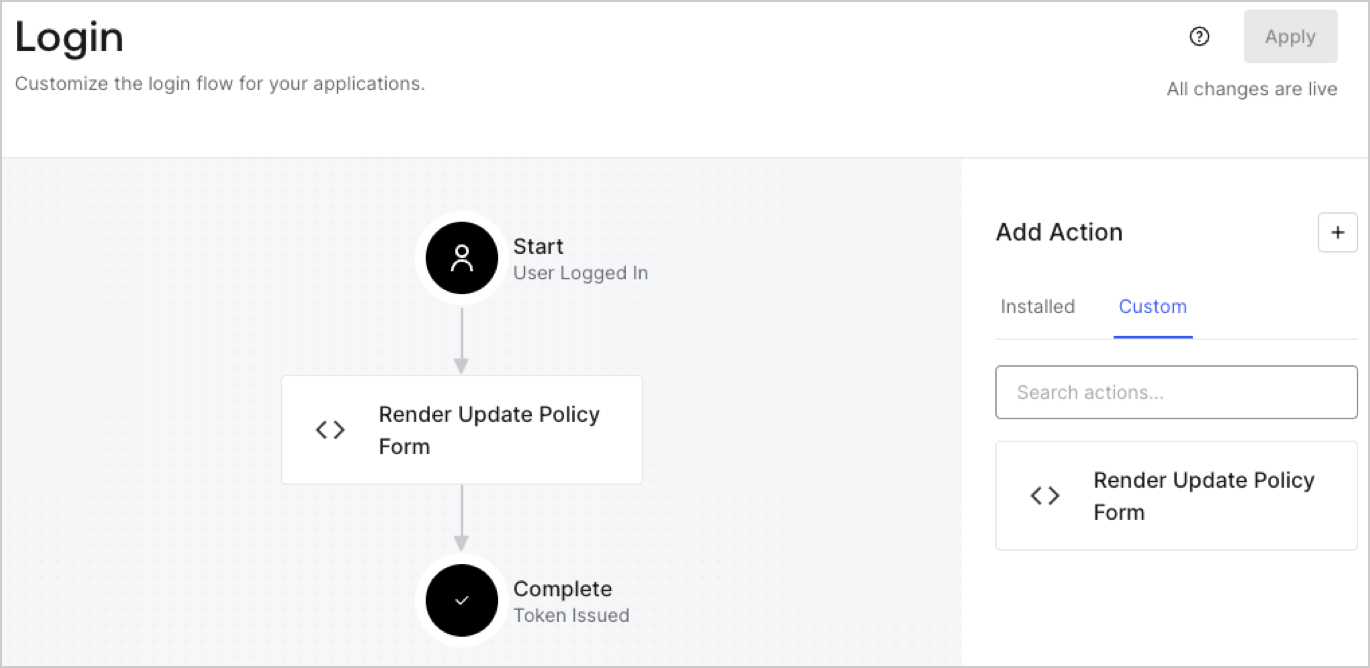
1. Navigate to **Auth0 Dashboard > Actions > Flows > Login.**
2. Select the **+** icon and Select **Build from scratch**:

   * **Name**: Enter `Render Update Policy Form`.
   * **Trigger**: Select `Login / Post Login`.
   * **Runtime**: Select the recommended version.
3. Select **Create**.

To configure the post-login Action:

1. Delete the existing code from the Code editor.
2. Paste the form render code into the Code editor.
3. Edit the code to define the conditional logic that will render the form.

   ```javascript lines theme={null}
   /**
   * @param {Event} event - Details about the user and the context in which they are logging in.
   * @param {PostLoginAPI} api - Interface whose methods can be used to change the behavior of the login.
   */
   exports.onExecutePostLogin = async (event, api) => {
     const FORM_ID = 'REPLACE_WITH_YOUR_FORM_ID';

     if (event.user.app_metadata.privacy_policies !== true) {
       api.prompt.render(FORM_ID);
     }
   }

   exports.onContinuePostLogin = async (event, api) => { }
   ```

   <Callout icon="file-lines" color="#0EA5E9" iconType="regular">
     The example code above will render the form when a user is missing the app metadata `privacy_policies` property.
   </Callout>
4. Select **Deploy.**
5. Drag and Drop the **Render Update Policy Form** Action to the **Login** flow.
   <Frame>
     <img src="https://mintcdn.com/docs-staging-feat-member-mgmt-docs/XM34iKXuAcvAZzla/docs/images/cdy7uua7fh8z/5TOwDgevZsBqd7yZynUYWU/41ca909dc3007aed4f40ff794a05efa5/postlogin.png?fit=max&auto=format&n=XM34iKXuAcvAZzla&q=85&s=085f8cb69653bf26daf50d48e94f06c5" alt="Dashboard > Forms > Use Case > Render update policy form login action" data-og-width="1370" width="1370" data-og-height="668" height="668" data-path="docs/images/cdy7uua7fh8z/5TOwDgevZsBqd7yZynUYWU/41ca909dc3007aed4f40ff794a05efa5/postlogin.png" data-optimize="true" data-opv="3" srcset="https://mintcdn.com/docs-staging-feat-member-mgmt-docs/XM34iKXuAcvAZzla/docs/images/cdy7uua7fh8z/5TOwDgevZsBqd7yZynUYWU/41ca909dc3007aed4f40ff794a05efa5/postlogin.png?w=280&fit=max&auto=format&n=XM34iKXuAcvAZzla&q=85&s=d9df12ee91e68e9c4d9187bac1fb36ec 280w, https://mintcdn.com/docs-staging-feat-member-mgmt-docs/XM34iKXuAcvAZzla/docs/images/cdy7uua7fh8z/5TOwDgevZsBqd7yZynUYWU/41ca909dc3007aed4f40ff794a05efa5/postlogin.png?w=560&fit=max&auto=format&n=XM34iKXuAcvAZzla&q=85&s=d5b39630f0ca91f078e5902432dd0e7a 560w, https://mintcdn.com/docs-staging-feat-member-mgmt-docs/XM34iKXuAcvAZzla/docs/images/cdy7uua7fh8z/5TOwDgevZsBqd7yZynUYWU/41ca909dc3007aed4f40ff794a05efa5/postlogin.png?w=840&fit=max&auto=format&n=XM34iKXuAcvAZzla&q=85&s=230a5f759700ba072d919b44e584442c 840w, https://mintcdn.com/docs-staging-feat-member-mgmt-docs/XM34iKXuAcvAZzla/docs/images/cdy7uua7fh8z/5TOwDgevZsBqd7yZynUYWU/41ca909dc3007aed4f40ff794a05efa5/postlogin.png?w=1100&fit=max&auto=format&n=XM34iKXuAcvAZzla&q=85&s=9f8094a4dbc6604303ca693e4063329b 1100w, https://mintcdn.com/docs-staging-feat-member-mgmt-docs/XM34iKXuAcvAZzla/docs/images/cdy7uua7fh8z/5TOwDgevZsBqd7yZynUYWU/41ca909dc3007aed4f40ff794a05efa5/postlogin.png?w=1650&fit=max&auto=format&n=XM34iKXuAcvAZzla&q=85&s=0b52d02f611ac4e27fd801c4fd31b32f 1650w, https://mintcdn.com/docs-staging-feat-member-mgmt-docs/XM34iKXuAcvAZzla/docs/images/cdy7uua7fh8z/5TOwDgevZsBqd7yZynUYWU/41ca909dc3007aed4f40ff794a05efa5/postlogin.png?w=2500&fit=max&auto=format&n=XM34iKXuAcvAZzla&q=85&s=4c478f1224ef7206650e02341820e30d 2500w" />
   </Frame>
6. Select **Apply.**

### Test implementation

Test the implementation by following these steps:

1. Log in with an existing user whose app`_metadata` attribute `privacy_policies` does not have a value.
2. The post-login Action in the Login flow will render the form and prompt for acceptance.
3. Select **Auth0 Dashboard > User Management > Users,** locate the user and verify that the `app_metadata` attribute `privacy_policies` contains a `true` value and a timestamp.
